

Webhooks
Get a signed HTTPS request from Shipping Engine every time one of your shipments changes.
- Product
- APIShipping Engine API
- Section
- Webhooks
- Reading time
- 11 min read
Webhooks tell your system when a shipment moves, so you don't have to poll. When a courier picks up,
delivers, cancels or returns a parcel, Shipping Engine sends a signed POST request to a URL you
choose.
In short
- You register one HTTPS endpoint per organisation with
POST /b2b/webhook/setWebhook, together with a secret you generate. - Before saving it, Shipping Engine sends a challenge. Your endpoint must echo it back, or it receives no events.
- Every event is signed with your secret. Verify the signature, answer
2xxquickly, and process the event in the background.
What you can use webhooks for
| You want to… | Listen for |
|---|---|
| Show "Shipped" with a tracking link as soon as the courier accepts the booking | shipment.dispatched |
| Tell the customer a driver is on the way (instant couriers) | shipment.pending_pickup with driver fields |
| Update the order timeline | shipment.in_transit, shipment.delivered |
| Stop fulfilment or contact the customer | shipment.cancelled, shipment.problem_detected, shipment.pickup_failed |
| Handle returns | shipment.rts_* |
| Reconcile your balance | shipment.price_changed, shipment.measurement_changed, shipment.rts_billed |
The full list, with payloads, is in Events.
Set up your endpoint
Generate a secret
Create a random secret of at least 32 characters and store it in your secret manager. Shipping Engine uses it to sign every event, and you use it to check the signature. You choose it; Shipping Engine never shows it back to you.
openssl rand -hex 32InboundOutput 3f9c1d6e8a4b2f7c0e5d9a1b6c3f8e2d7a4b0c9e5f1d6a3b8c2e7f4a9d0b5c1eBuild the endpoint
Your endpoint must do two things:
- Answer the challenge. When you register, Shipping Engine sends an unsigned
POSTwith the body{"challenge":"<uuid>"}. Reply with any2xxstatus and the body{"challenge":"<uuid>"}(the same value), or just the raw value as plain text. - Verify and accept events. Every event carries an
x-webhook-signatureheader. Check it on the raw request body, reply2xx, then process the event.
A request without an
x-webhook-signatureheader is the challenge. Everything else is an event.server.js (Express) import express from 'express'; import crypto from 'node:crypto'; const app = express(); const SECRET = process.env.FASTRAC_WEBHOOK_SECRET; function isValidSignature(rawBody, headers) { const id = headers['x-webhook-id']; const timestamp = headers['x-webhook-timestamp']; const match = /sig=([0-9a-f]+)/.exec(headers['x-webhook-signature'] ?? ''); if (!id || !/^\d+$/.test(timestamp ?? '') || !match) return false; if (Math.abs(Date.now() / 1000 - Number(timestamp)) > 300) return false; const bodyHash = crypto.createHash('sha256').update(rawBody).digest('hex'); const expected = crypto .createHmac('sha256', SECRET) .update(`${timestamp}.${id}.${bodyHash}`) .digest(); const received = Buffer.from(match[1], 'hex'); return received.length === expected.length && crypto.timingSafeEqual(received, expected); } // express.raw keeps the exact bytes Shipping Engine signed app.post('/webhooks/shipping-engine', express.raw({ type: '*/*' }), (req, res) => { if (!req.get('x-webhook-signature')) { const { challenge } = JSON.parse(req.body.toString('utf8') || '{}'); return res.json({ challenge }); // the verification challenge } if (!isValidSignature(req.body, req.headers)) return res.sendStatus(401); res.sendStatus(200); // acknowledge first… const event = JSON.parse(req.body.toString('utf8')); queueForProcessing(req.get('x-webhook-id'), req.get('x-webhook-event-type'), event); // …work later }); app.listen(3000);These handlers use one secret. To rotate secrets without downtime, select the secret by
keyId, as shown in Verify signatures.Deploy the endpoint on a public HTTPS URL before you register it. For local development, see Testing webhooks.
- Answer the challenge. When you register, Shipping Engine sends an unsigned
Register the endpoint
Call
POST /b2b/webhook/setWebhookwith your URL and secret. Your API key needs theMANAGE_WEBHOOKSpermission.curl -s -X POST "$FASTRAC_API/b2b/webhook/setWebhook" \ -H "Authorization: Bearer $FASTRAC_TOKEN" \ -H "Content-Type: application/json" \ -d '{ "name": "Production order updates", "url": "https://shop.example.com/webhooks/shipping-engine", "secret": "'"$FASTRAC_WEBHOOK_SECRET"'", "keyId": "key-2026-11", "eventTypes": ["shipment.*"] }'Field Type Required Description namestring, up to 100 characters Yes A label for your own reference. urlstring Yes Your endpoint. Must start with https://.secretstring, at least 32 characters Yes The signing secret you generated. keyIdstring, up to 64 characters No A name for this secret. It is sent in every signature header so you can tell secrets apart. Default: a generated value such as whsec_4f1c….eventTypesarray of 1–20 strings No Which events to send. See Event filters. Default: ["shipment.*"].timeoutMsinteger, 1000–60000 No How long Shipping Engine waits for your response, in milliseconds. Default: 10000(10 seconds).maxAttemptsinteger, 1–50 No Total delivery attempts per event, including the first. Default: 8. See Delivery and retries.InboundResponse (201) { "statusCode": 201, "message": "Webhook endpoint registered", "data": { "id": 42, "name": "Production order updates", "url": "https://shop.example.com/webhooks/shipping-engine", "isEnabled": true, "verificationStatus": "verified", "apiVersion": "V3", "timeoutMs": 10000, "maxAttempts": 8, "eventTypes": ["shipment.*"], "activeSecretKeyIds": ["key-2026-11"], "createdAt": "2026-11-20T03:12:09.511Z", "updatedAt": "2026-11-20T03:12:09.511Z", "backoffUntil": null, "failureCount": 0, "challenge": { "success": true, "statusCode": 200 } } }One endpoint per organisation
Each organisation has one webhook endpoint. Calling
setWebhookagain replaces the URL, the secret, thekeyIdand the event filters immediately. There is no overlap period: from that moment every event is signed with the new secret. Fields you leave out keep a default (eventTypes,keyId) or their previous value (timeoutMs,maxAttempts).Check that verification passed
Look at
data.challenge.successanddata.verificationStatusin the response. A201alone does not mean your endpoint works.Result What it means What to do challenge.success: true,verificationStatus: "verified"Your endpoint answered the challenge. Nothing. Events start flowing. challenge.success: false,verificationStatus: "failed"(HTTP 201)The endpoint was saved, but it receives no events. Read challenge.statusCode,challenge.responseBodyorchallenge.error, fix the endpoint, and callsetWebhookagain.HTTP 422 The webhook URL could not be verified. The current webhook endpoint stays active and unchanged.You already had a verified endpoint, and the new URL failed the challenge. Your old endpoint keeps working with its old secret. Fix the new URL and try again. InboundResponse when the challenge fails (201) { "statusCode": 201, "message": "Webhook endpoint registered", "data": { "id": 42, "verificationStatus": "failed", "challenge": { "success": false, "statusCode": 200, "responseBody": "{\"ok\":true}" } } }The challenge waits up to 10 seconds for your reply. A
2xxwith the wrong body still fails. Typical causes: the route doesn't handle unsigned requests, a framework returns a fixed body, or a firewall blocks the request.
Event filters
eventTypes decides which events reach your endpoint. Each entry is a pattern:
| Pattern | Matches |
|---|---|
* | Every event. |
shipment.* | Every shipment event (the default). |
shipment.delivered | Exactly that event. |
*.delivered | Any event ending in .delivered: shipment.delivered, shipment.rts_delivered. |
shipment.rts_* | Every return (RTS) event, including shipment.rts_billed. |
An event is sent if it matches any pattern in the list. Patterns are case-sensitive.
Tip
Start with shipment.* and ignore the events you don't need in your handler. If you subscribe to
a short list instead, you won't receive events that are added later, such as
shipment.status_updated.
Check your current endpoint
GET /b2b/webhook/info returns your endpoint (as a one-item array, or an empty array if none is
registered). It needs the READ_WEBHOOKS permission.
curl -s "$FASTRAC_API/b2b/webhook/info" \
-H "Authorization: Bearer $FASTRAC_TOKEN"{
"statusCode": 200,
"message": "Request successful.",
"data": [
{
"id": 42,
"name": "Production order updates",
"url": "https://shop.example.com/webhooks/shipping-engine",
"isEnabled": true,
"verificationStatus": "verified",
"apiVersion": "V3",
"timeoutMs": 10000,
"maxAttempts": 8,
"eventTypes": ["shipment.*"],
"activeSecretKeyIds": ["key-2026-11"],
"createdAt": "2026-11-20T03:12:09.511Z",
"updatedAt": "2026-11-20T03:12:09.511Z",
"backoffUntil": null,
"failureCount": 0
}
]
}| Field | Meaning |
|---|---|
isEnabled | false if the endpoint has been disabled. No events are sent while it is disabled. |
verificationStatus | verified, failed or unverified. Only verified endpoints receive events. |
activeSecretKeyIds | The keyId of the secret that signs events. The secret itself is never returned. |
failureCount | Consecutive failed delivery attempts. Resets to 0 after any successful delivery. |
backoffUntil | If set, deliveries are paused until this time. See Endpoint pause. |
Both endpoints are also listed in the API reference.
Manage the endpoint in the dashboard
Business users can also manage the endpoint on the dashboard's API Integration page, under
Webhook Configuration. They need the MANAGE_WEBHOOKS permission.
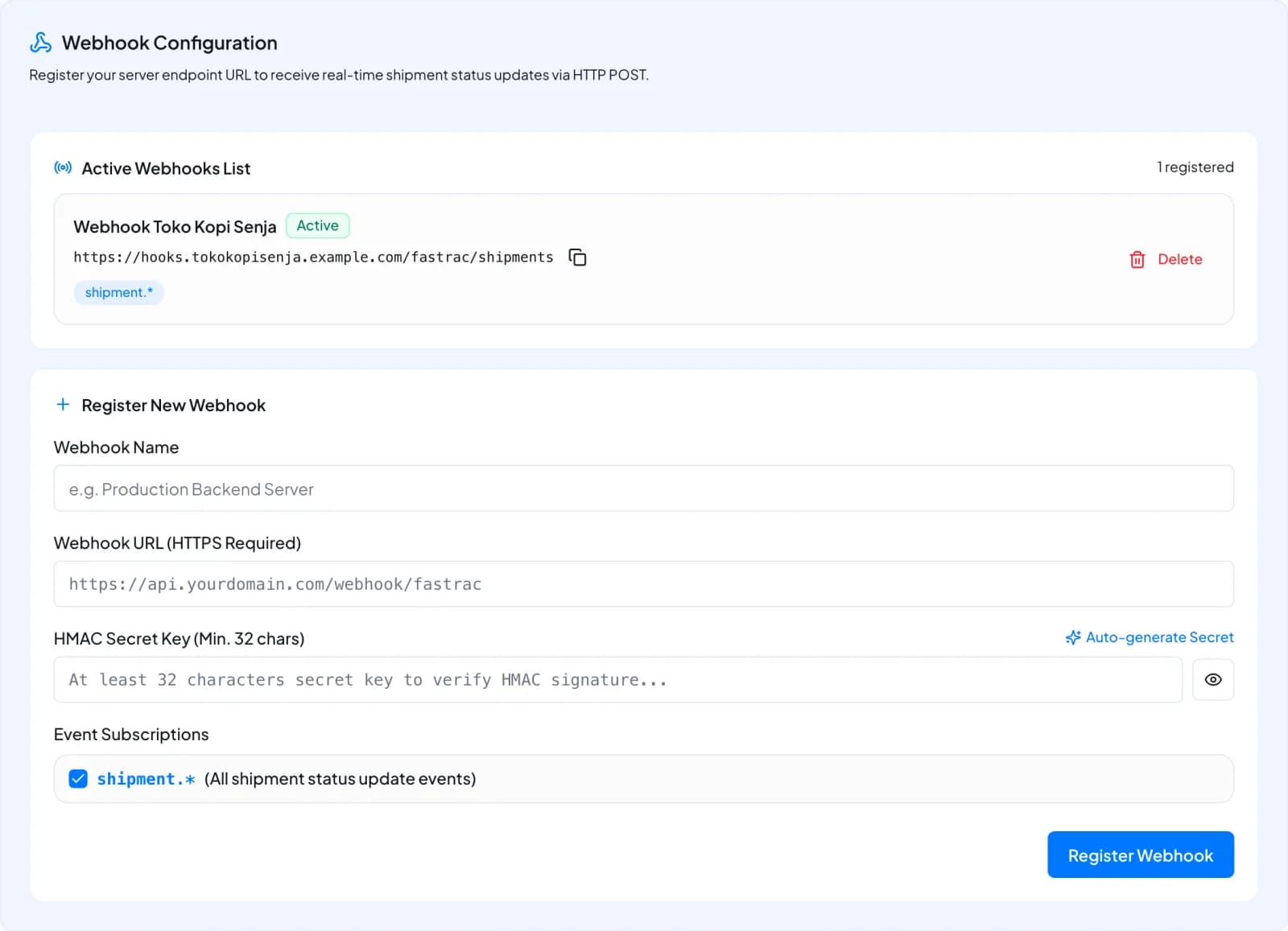
- Register New Webhook takes a Webhook Name, a Webhook URL (HTTPS Required) and an
HMAC Secret Key of at least 32 characters (Auto-generate Secret creates one). The only event
subscription offered is
shipment.*. The challenge runs the same way as with the API. Registering again replaces the endpoint and its secret immediately. - Active Webhooks List shows the endpoint's name, URL, event filters and an Active label.
- Delete removes the endpoint and stops webhooks completely. Register again to start over.
The dashboard doesn't set keyId, timeoutMs or maxAttempts (defaults apply), doesn't show
verificationStatus, and can't disable an endpoint temporarily. Use the API to see or change these.
Endpoint requirements
| Requirement | Details |
|---|---|
| HTTPS only | The URL must start with https://. Plain HTTP is rejected. |
| Valid certificate | A certificate from a public certificate authority that matches the host name. Self-signed and expired certificates fail. |
| Public address | The host must resolve to a public IP address. Private, loopback and link-local addresses (for example 10.x, 192.168.x, 127.0.0.1) are rejected. |
| No redirects | A 3xx response is not followed and counts as a failed delivery. Register the final URL. |
Fast 2xx | Reply within timeoutMs (10 seconds by default). Connecting must take under 3 seconds. |
| Small response | Shipping Engine reads at most 64 KB of your response body and ignores the rest. Return an empty body or a short JSON. |
Next steps
Was this page helpful?