

Get API credentials
Where your API key comes from, where to find it in the dashboard, and how to keep it safe.
- Product
- APIShipping Engine API
- Section
- Get started
- Reading time
- 5 min read
Your API key is a keyId plus two secrets: one for production and one for the sandbox. You exchange
them for an access token on every environment. This page shows where the key comes from and how to
look after it.
Before you start: you need a Fastrac business account whose business verification (KYC)
is approved, and a dashboard role that can see API keys (READ_API_KEYS; organisation admins have it).
How keys are issued
You don't create a key yourself. When Shipping Engine approves your business verification, it creates your organisation and issues one API key for it. If you were onboarded by Fastrac directly, support issues the key for you.
| Value | What it is | Use it as |
|---|---|---|
keyId | A stable identifier, based on your organisation's name. Never changes, even when you rotate. | client_id, in sandbox and production |
secret | The production secret. | client_secret for production |
sandboxSecret | The sandbox secret. | client_secret for the sandbox |
Anyone who can open the API Integration page can read the secrets
The dashboard shows both secrets, on demand, on the API Integration page. Limit who has a dashboard role that can see API keys.
Find your key
Open API Integration
Sign in to the Fastrac dashboard and select API Integration in the sidebar. Scroll to API Credentials Configuration.
Copy the values for each environment
Select Production or Sandbox. Each tab shows the Base URL, the Client ID (your
keyId) and the secret for that environment (Client Secret on Production is yoursecret; the Sandbox tab shows yoursandboxSecret). The secret is hidden until you select the eye icon. Use the copy icons to copy each value.app.fastrac.cc/api-integration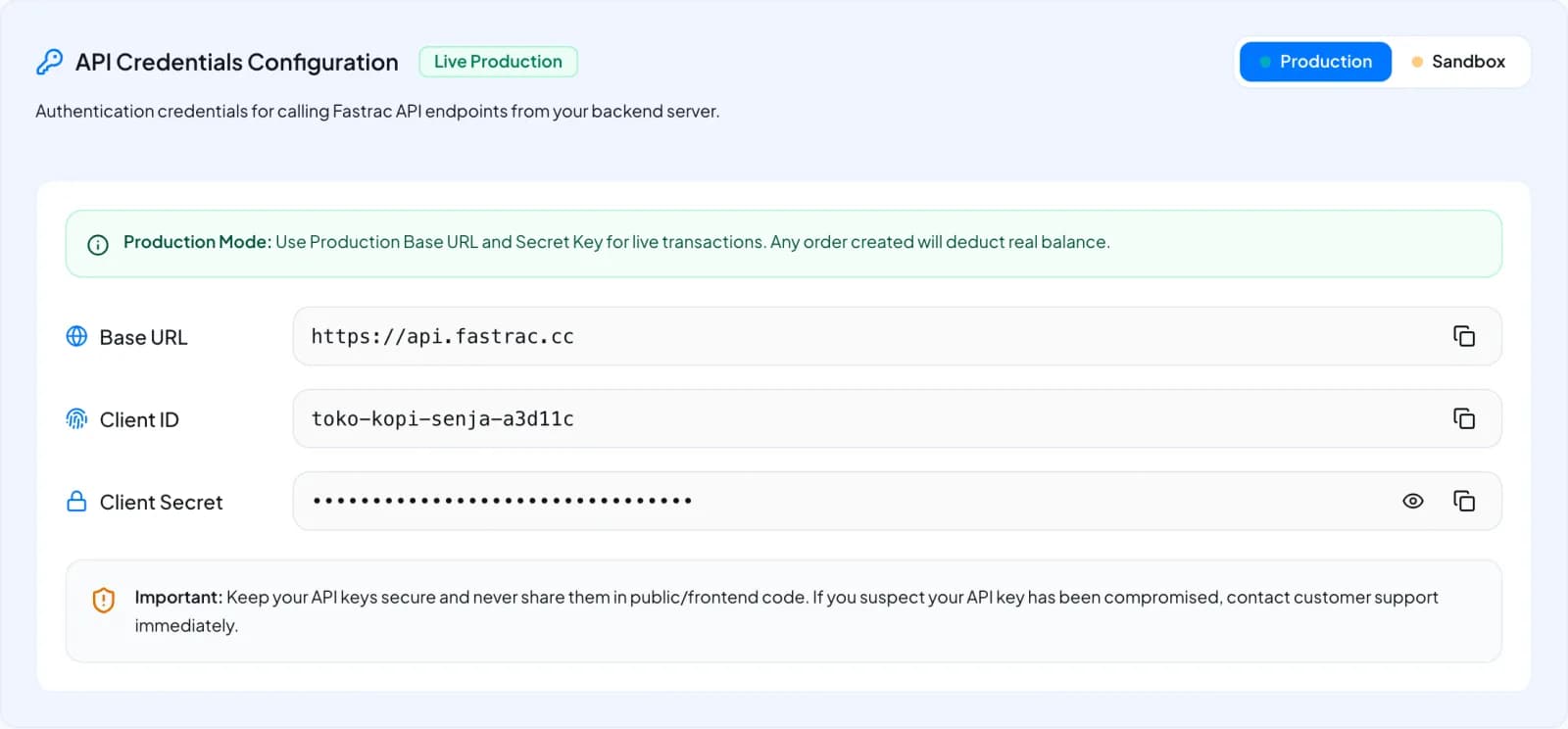
API Integration → API Credentials Configuration, Production tab.
The Base URL shown in the dashboard is the real API host for that environment. In these docs we write it
as https://api.fastrac.example (production) and https://sandbox-api.fastrac.example (sandbox).
Store secrets safely
- Keep secrets in a secret manager or encrypted environment variables, never in source code, mobile apps or browser code.
- Call the Shipping Engine API from your server only. Anyone with the secret can create orders that are paid from your balance.
- Keep the production
secretout of development and test machines. UsesandboxSecretthere. - Limit who in your team can see or rotate secrets.
What a key can do
There is one key per organisation, and it acts as the organisation owner: the person whose business verification created the organisation. Every call made with the key:
- has the owner's role permissions, and nothing more;
- creates orders and shipments that belong to the owner, paid from the owner's balance;
- sees the same shipments and balance logs as the owner does in the dashboard.
If the owner's role loses a permission, the key loses it too, and calls that need it return 403. See Authentication and Permissions.
Rotate a key
Rotate when a secret may have leaked, when someone with access leaves, or when you have lost control of a secret.
Ask support to rotate
The dashboard has no rotate button. Contact Fastrac support from an organisation Admin account and ask for your API key to be rotated. You get a new
secretand a newsandboxSecret; thekeyIdstays the same.Copy both new secrets
Once support confirms, open API Integration and copy the new secrets from the Production and Sandbox tabs into your secret manager.
Deploy the new secrets
Update every server that requests tokens. The old secrets stop working immediately, so new token requests with them fail. Tokens already issued keep working until they expire.
There is no overlap period
Rotation takes effect at once. Agree a time with support and have your deployment ready, so token requests don't fail in between.
Troubleshooting
| Problem | Fix |
|---|---|
| API Integration shows no key | Your business verification is not approved yet, or your role can't see API keys (READ_API_KEYS). Contact support if both are fine. |
| The Sandbox tab says Sandbox Key Unavailable | The sandbox key could not be set up for your organisation. Contact support to have it issued. |
| The token endpoint rejects the secret | Check you are using the right secret for the right environment. If you rotated, use the newest secret. |
| You need a second key, for example per shop | Each organisation has one key. Contact Fastrac support or your account manager. |
Next steps
Was this page helpful?