

Custom domain
Serve your store on your own domain, such as shop.yourbrand.com.
- Product
- SHOPFastrac Shop
- Section
- Get started
- Reading time
- 2 min read
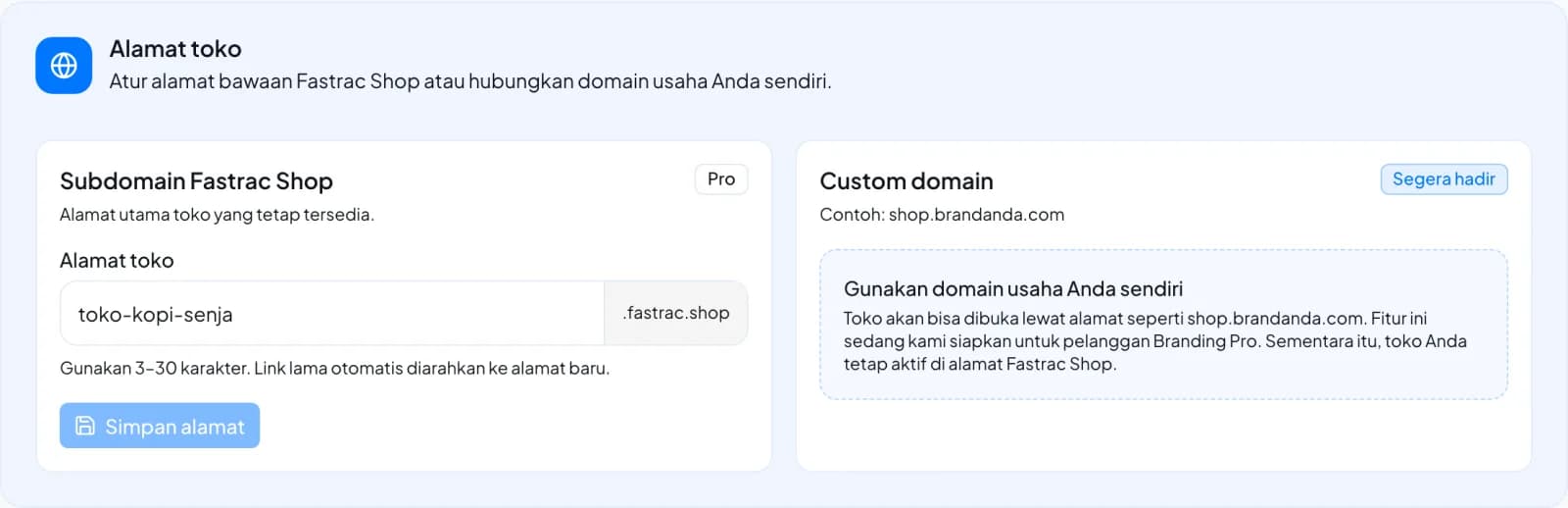
A custom domain lets buyers reach your store on your own domain (for example shop.yourbrand.com)
instead of your-store.fastrac.shop. It is part of Branding Pro, but it can't be set up in the
dashboard yet: the Custom domain card on Store Appearance is marked Segera hadir (coming
soon). Until then, your store stays available on its fastrac.shop link.
What you can do now
- Share your
fastrac.shoplink. With Branding Pro you can change its slug; see Set up your store. - If you need a custom domain, contact support.
Planned setup
When custom domains open in the dashboard, setup works like this:
- You enter your domain, for example
shop.yourbrand.com. Its status isPENDING_VERIFICATION. - At your DNS provider, you add a CNAME record: the name is your domain, and the target is the one shown in the dashboard.
- After the record takes effect (minutes to hours), you verify the domain. When the CNAME points to the right target, the status becomes
ACTIVE.
Use a subdomain
Most DNS providers don't allow a CNAME on a root domain (yourbrand.com). Use a subdomain such as
shop.yourbrand.com or store.yourbrand.com.
Rules
| Rule | Detail |
|---|---|
| Plan | Branding Pro only. Without Branding Pro, buyers are served on your-store.fastrac.shop. |
| Not allowed | Domains ending in fastrac.shop or fastrac.id |
| Unique | A domain can belong to one store only |
| Record type | CNAME to the target shown in the dashboard |
| Statuses | PENDING_VERIFICATION until verified, then ACTIVE |
FAQ
Check that the record type is CNAME (not A), that the name is exactly your domain, and that the
target matches the dashboard. Some providers add your domain to the name automatically, so enter
only the subdomain part (for example shop). Then wait for DNS to update and verify again.
While your domain is ACTIVE and Branding Pro is active, links to buyers' order pages use your
custom domain. Otherwise they use your fastrac.shop link. Keep the CNAME record in place.
Another store registered that domain. Use a different domain or subdomain, or contact support if you own it.
Was this page helpful?