

Shipping settings
Choose which delivery options and couriers your buyers can pick.
- Product
- SHOPFastrac Shop
- Section
- Your store
- Reading time
- 3 min read
Shipping settings control what buyers can choose at checkout: regular or instant couriers, store pickup, which couriers to hide, and whether couriers pick parcels up from you or you drop them off.
Who can do this
- The store owner.
- Store pickup needs an origin address, and courier pickups and instant couriers need its map location. You set it on the same page.
Steps
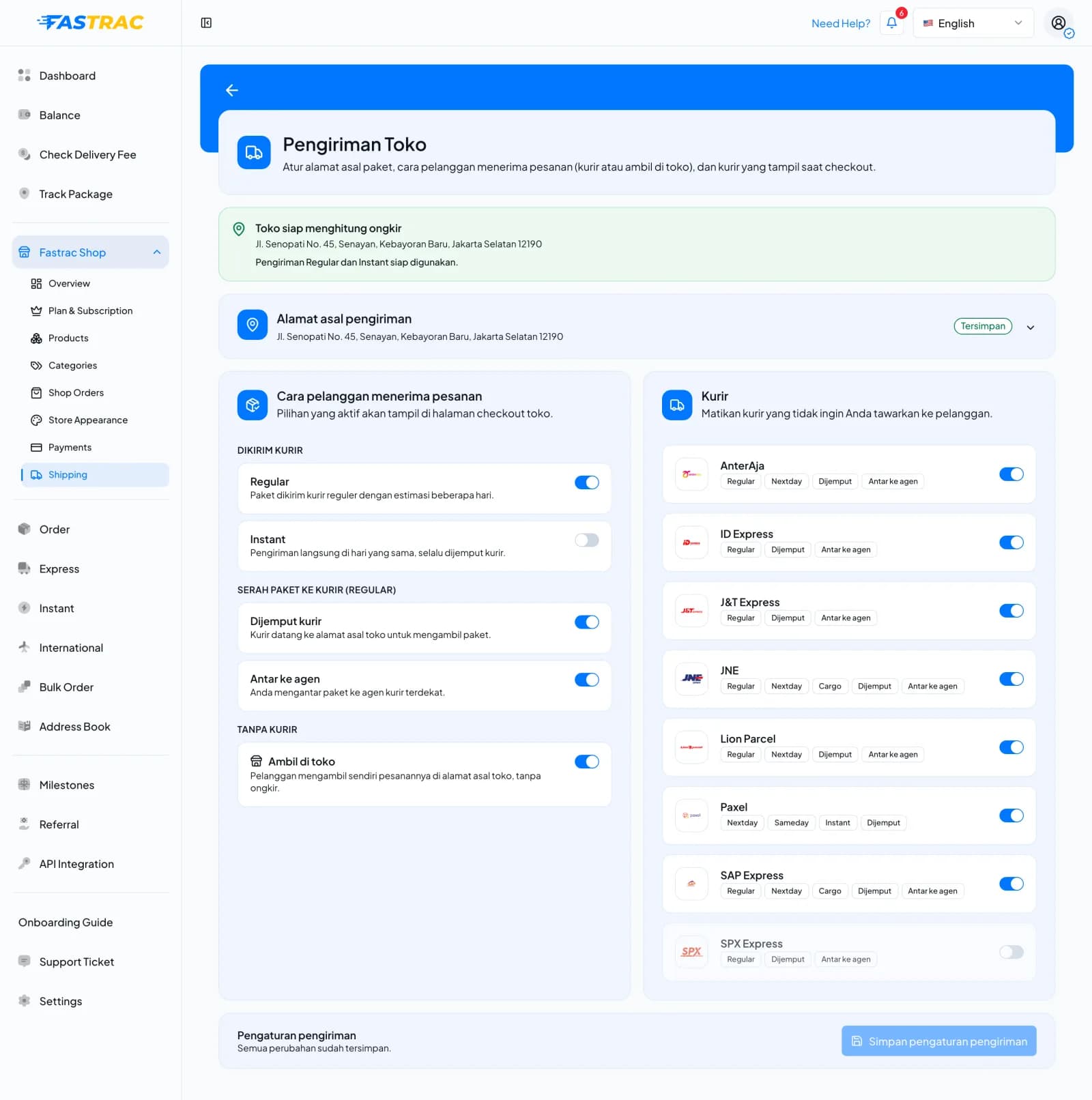
- Open Fastrac Shop › Shipping (Pengiriman Toko). The green banner (Toko siap menghitung ongkir) confirms that your store can calculate shipping and shows the origin address.
- Expand Alamat asal pengiriman (origin address) to choose or change the address you ship from. It shows Tersimpan once saved.
- Under Cara pelanggan menerima pesanan (how buyers receive orders), choose the options buyers see at checkout:
- Dikirim kurir (sent by courier): Regular and/or Instant.
- Serah paket ke kurir (Regular) (handing parcels to the courier): Dijemput kurir (the courier picks up) and/or Antar ke agen (you drop off at a courier agent).
- Tanpa kurir (no courier): Ambil di toko (store pickup) if buyers may collect orders from your address.
- Under Kurir, turn off any courier you don't want to offer. Each courier shows the services and handover methods it supports. Leave all on to offer every courier.
- Click Simpan pengaturan pengiriman (save shipping settings).
Options
| Setting | Effect |
|---|---|
| Regular | Buyers see regular couriers (JNE, J&T Express, SPX and others) |
| Instant | Buyers see instant couriers. They always pick up from your origin address, which needs a map location. |
| Dijemput kurir (pickup) | Couriers may collect parcels from your origin address. Regular pickups need its map location. |
| Antar ke agen (drop-off) | You bring parcels to a courier counter |
| Ambil di toko (store pickup) | Buyers collect the order from your address; no courier |
| Couriers turned off under Kurir | Couriers hidden from buyers |
New stores start with regular, instant, pickup and drop-off on, and store pickup off.
Rules
| Rule | Detail |
|---|---|
| At least one way to deliver | Turn on regular, instant or store pickup |
| Courier delivery needs a handover method | With regular or instant on, turn on pickup or drop-off |
| Store pickup needs an origin address | Set it before turning store pickup on |
Pickup or drop-off per order
When you confirm an order's payment, you can choose pickup or drop-off for that order, from the methods both your settings and the courier service allow. For a pickup, you can choose the pickup time (at least 15 minutes ahead). Instant couriers always pick up.
FAQ
The courier may be turned off in your settings, not serve the route, or not accept the parcel's size or weight. Instant couriers also need your origin address to have a map location.
Your origin address has no map location. Pick an address with a pinned location as the store origin.
There is no shipping cost. The 2% platform fee is taken from the item value instead. See Fees and billing.
Was this page helpful?