

Managing orders
Confirm buyers' payments, ship orders, handle store pickups, and cancel when needed.
- Product
- SHOPFastrac Shop
- Section
- Selling
- Reading time
- 6 min read
Every store order waits for your action after the buyer pays. You check the money arrived, confirm the payment, and Fastrac books the courier. You can also reject a payment, retry a booking that failed, mark store pickups as collected, and cancel orders.
Who can do this
- The store owner.
- To confirm a courier order, you need enough shipping credit for the shipping cost and the 2% platform fee.
Find your orders
Open Fastrac Shop › Shop Orders (Pesanan Shop). The cards at the top count orders Menunggu pembayaran (waiting for payment), Perlu diperiksa (to check) and Sudah diproses (processed). Filter by status with Semua, Menunggu, Review, Dibayar, Perlu tindakan, Terkirim and Dibatalkan, by delivery with Kurir or Ambil di toko, or search with Cari kode atau pelanggan. Click Lihat detail to open an order.
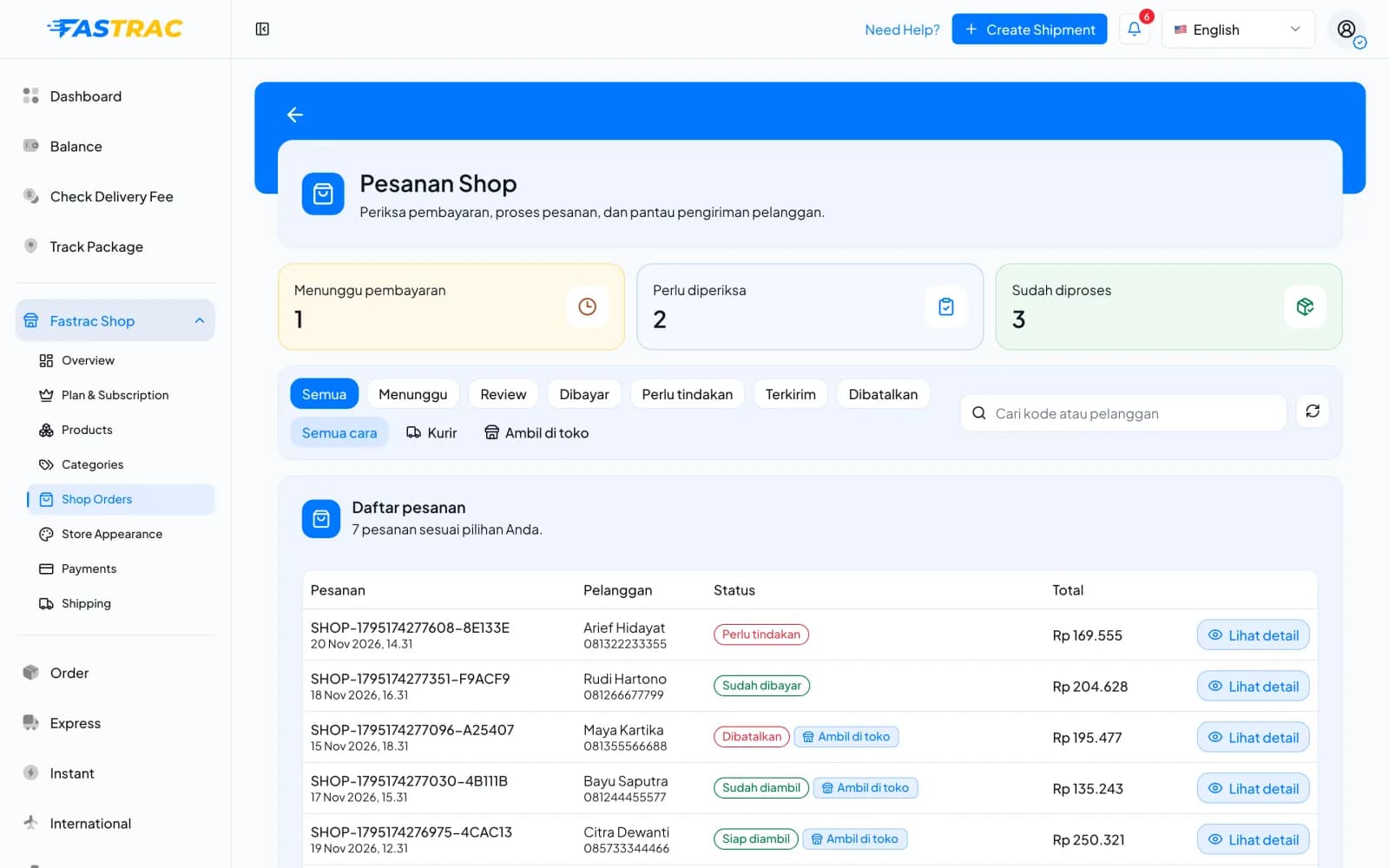
Order statuses
| Status | Badge in the dashboard | Meaning | What you do |
|---|---|---|---|
WAITING_PAYMENT | Menunggu pembayaran | The buyer placed the order and hasn't confirmed paying yet. | Wait, or confirm if you already see the money. |
AWAITING_MANUAL_REVIEW | Menunggu review | The buyer says they paid. | Check your account, then accept or reject the payment. |
PAID | Sudah dibayar; store pickup: Siap diambil | You accepted the payment. The courier is booked, or the order is ready for store pickup. | Hand the parcel to the courier, or wait for the buyer to collect. |
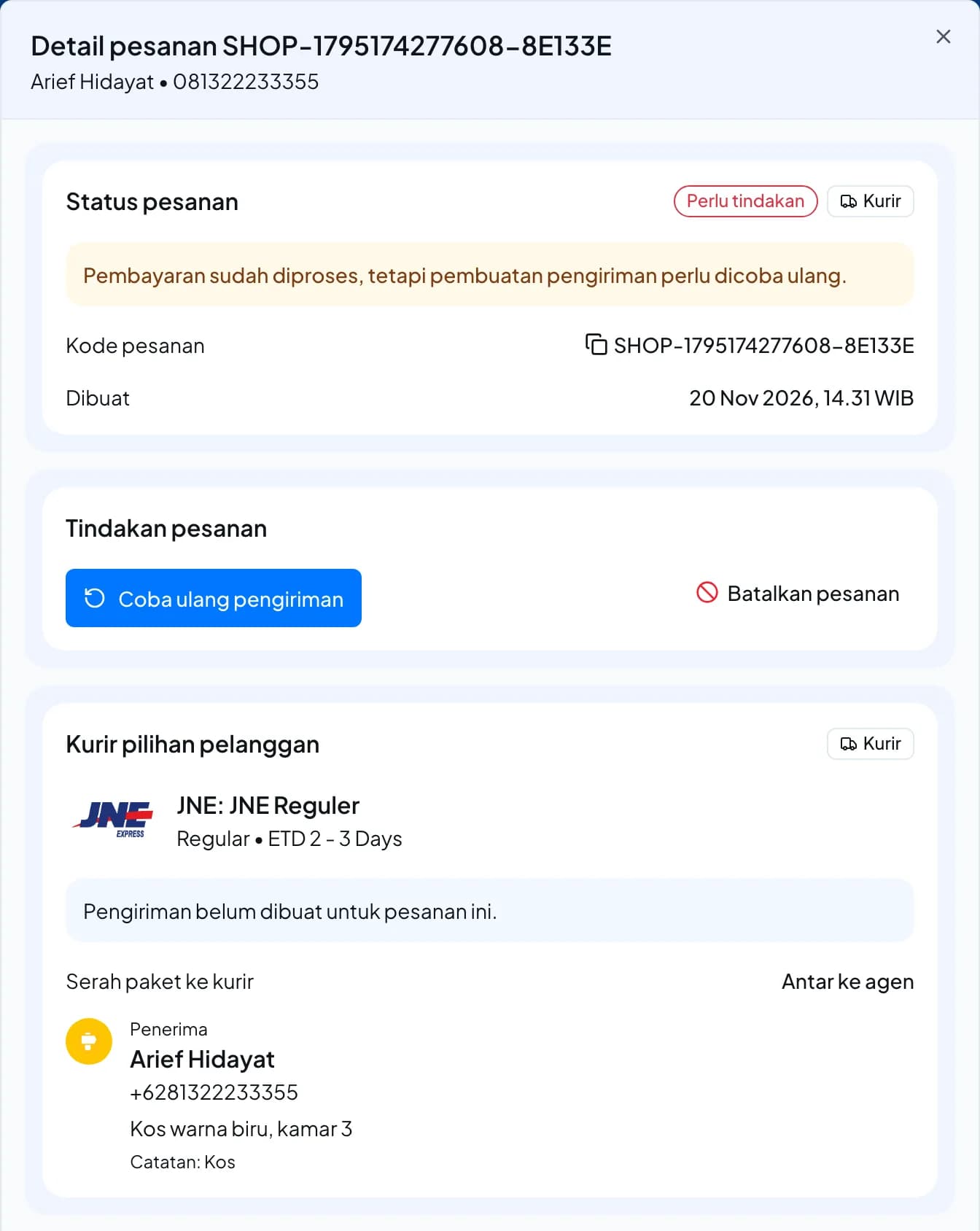
ACTION_REQUIRED | Perlu tindakan | Payment is recorded but booking the courier didn't finish. | Retry the booking. |
DELIVERED | Terkirim; store pickup: Sudah diambil | The shipment was delivered, or the buyer collected the order. Final. | Nothing. |
CANCELLED | Dibatalkan | Cancelled by you, or expired unpaid, or the parcel was returned to you. | Refund the buyer if they paid. |
Steps
Accept a payment
- Open an order with Menunggu review and click Lihat detail. Detail pesanan walks you through three steps.
- Cocokkan pembayaran (match the payment): check your bank or QRIS account for the exact amount shown, which includes the unique code. It also shows the method, the destination account (Rekening tujuan), the payment deadline (Batas bayar) and the customer. Chat pelanggan via WhatsApp opens a chat with the buyer.
- Cek barang pesanan (check the items): make sure everything is in stock, including add-ons and the buyer's note.
- Terima pesanan (accept the order): for a courier order, choose Dijemput kurir (pickup) or Antar ke agen (drop-off) if you're offered a choice, and for a pickup Jemput sekarang (now) or Jadwalkan (schedule, at least 15 minutes ahead). Then click Terima pembayaran (accept payment).
- Fastrac deducts the shipping cost and the platform fee from your shipping credit, books the courier and emails the buyer. Prepare the parcel and hand it over, or drop it off.
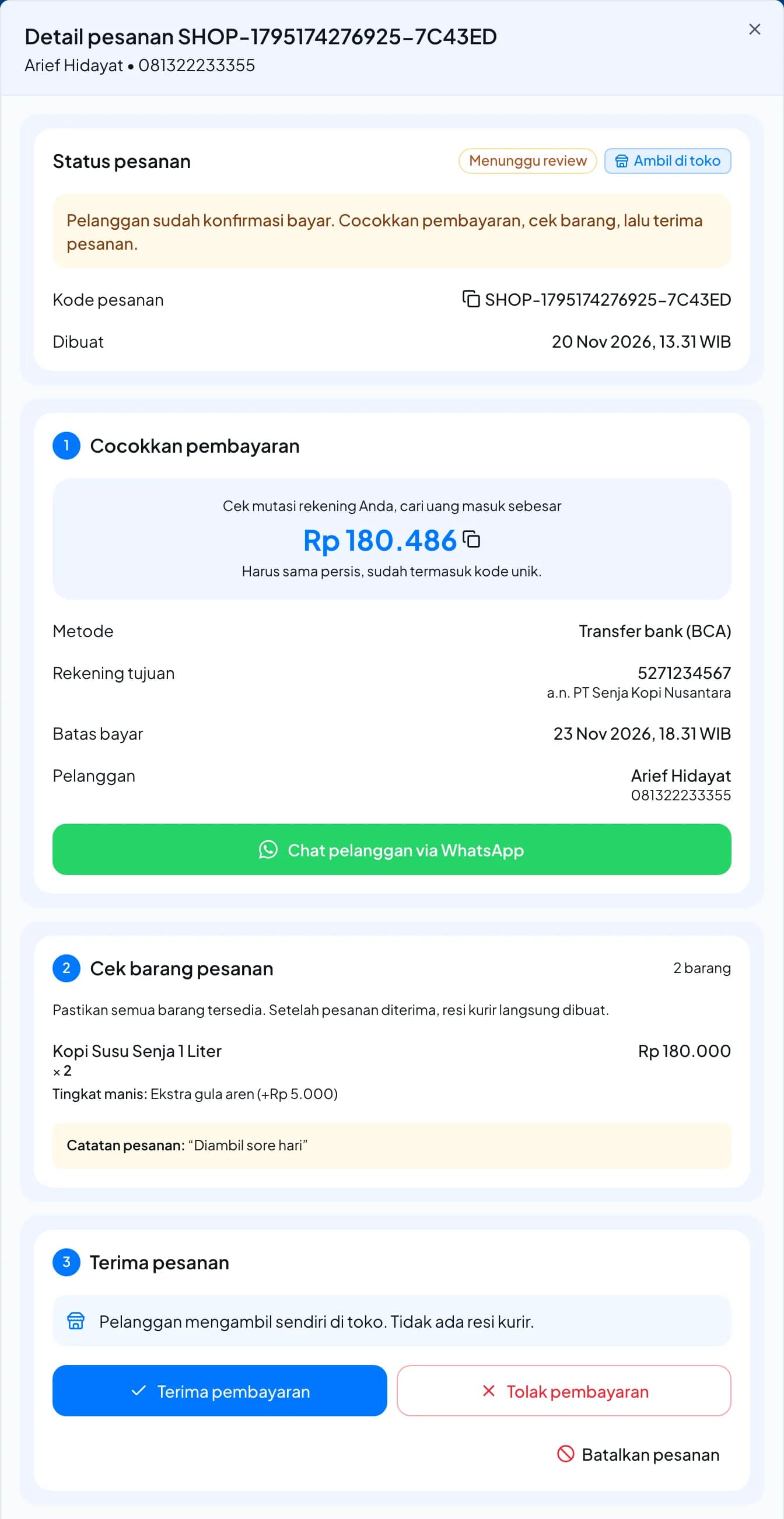
After you accept, the order shows the courier, No. Resi (airway bill), Cetak Resi (print label), Lacak (track) and the handover method.
Accept a price change
The shipping rate the buyer chose is only valid for a short time. If it has expired when you accept, the dashboard gets a new rate for the same courier service. If the price went up, it shows the difference (Ongkir naik …) and asks you to confirm.
- Review the new shipping cost.
- Confirm. The new cost (and the 2% fee on it) is deducted from your shipping credit. The buyer isn't charged again.
Reject a payment
If the money didn't arrive, click Tolak pembayaran (reject payment). The order goes back to
WAITING_PAYMENT and the buyer can pay and confirm again before the deadline.
Retry a failed booking
If an order shows Perlu tindakan, open it and click Coba ulang pengiriman (retry shipment) under Tindakan pesanan. You aren't charged again: Fastrac only finishes the booking. If it keeps failing, contact support with the order code.
Store pickup orders
- Accept the payment as above. Only the 2% platform fee is deducted; there is no courier. The order shows Siap diambil (ready for pickup).
- When the buyer collects the order, click Tandai sudah diambil (mark as collected) and confirm. The order shows Sudah diambil (
DELIVERED).
Cancel an order
- Open the order and click Batalkan pesanan (cancel order), then confirm.
- Fastrac returns the stock, cancels the courier booking, refunds what you paid (shipping cost and platform fee) to your shipping credit, and emails the buyer.
- If the buyer already paid you, refund them yourself. Fastrac never holds the buyer's money.
Limits and rules
| Item | Rule |
|---|---|
| Payment deadline | 3 days after checkout. Unpaid orders in WAITING_PAYMENT are then cancelled automatically and stock is returned. |
| Orders awaiting review | Don't expire. Confirm or reject them. |
| Cancel | Not possible once the shipment is in transit, delivered or has a problem |
| Pickup time | At least 15 minutes ahead (WIB) |
| Returned parcels (RTS) | The order is cancelled; the shipping cost and platform fee are not refunded, and a return fee may apply |
FAQ
Your shipping credit doesn't cover the shipping cost and fee. Top up and confirm again.
Cancel the order as soon as possible, before the courier picks up. What you paid goes back to your shipping credit.
Buyers can't cancel by themselves; they contact you on WhatsApp from their order page. Cancel the order in the dashboard and refund them if they paid.
Open the order to see its shipments, or use shipment tracking.
Was this page helpful?