

Top up your balance
Add money to your shipping credit with a manual top-up request or, where offered, QRIS.
- Product
- APPFastrac App
- Section
- Money
- Reading time
- 4 min read
Add money to your shipping credit (Saldo Ongkir) so you can pay for shipments. In the dashboard you send a manual top-up request that the Fastrac team approves. Some accounts also see an Automatic (QRIS) option to pay instantly.
Who can do this
- Signed-in users whose business verification (KYC) is approved. Until then, the Top Up button is not available.
- Top-ups always go into your own shipping credit.
Choose a method
| Manual Request | Automatic (QRIS), where offered | |
|---|---|---|
| How you pay | Transfer as agreed with the Fastrac team, then send a request | Scan a QR code with any banking or e-wallet app that supports QRIS |
| When the money arrives | After the team approves your request | Automatically, as soon as the payment succeeds |
| Fee | None charged by Fastrac | 0.75% of the amount |
| Amount | Any amount from Rp 50.000 | One of the fixed amounts: Rp 50.000, 100.000, 200.000, 500.000, 1.000.000, 1.500.000 or 2.000.000 |
Send a manual top-up request
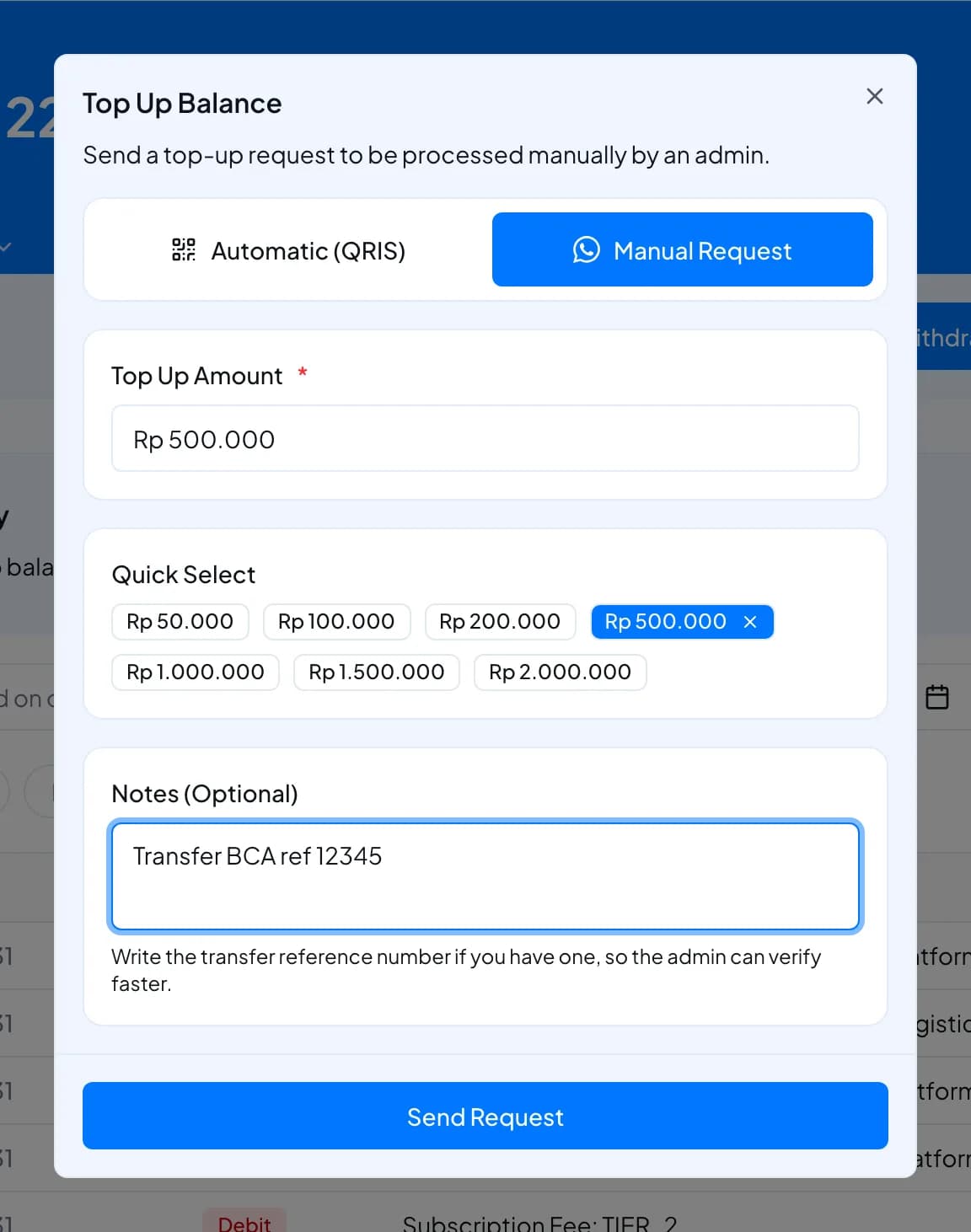
- Open Balance and select Top Up. The Top Up Balance window opens.
- If you see two options at the top, select Manual Request.
- Enter the Top Up Amount (at least Rp 50.000), or pick one under Quick Select.
- Optionally fill in Notes (Optional), up to 75 characters, for example your transfer reference. It helps the admin verify your transfer faster.
- Select Send Request. You see Top Up Request Submitted with a reference code. Select Contact Admin to message the team on WhatsApp and speed up the check, or close the window.
- When the request is approved, the amount is added to your shipping credit.
| Request status | Meaning |
|---|---|
| Pending | Waiting for review |
| Approved | The amount was added to your shipping credit |
| Rejected | Nothing was added. Contact support if you don't know why. |
Top up with QRIS
If your Top Up Balance window shows Automatic (QRIS):
- Select Automatic (QRIS).
- Under Select Top-Up Amount, pick one of the amounts. You can't type your own amount.
- Check the summary: Balance to be credited, Service fee (0.75%) and Total payment.
- Select Pay with QRIS. The payment page opens in a new tab. Scan the QR code with your banking or e-wallet app and pay. The QR code is valid for 24 hours.
- When the payment succeeds, the amount you picked is added to your shipping credit and you get a Top Up Berhasil notification.
Examples:
| You top up | Service fee (0.75%, rounded up) | You pay | Added to shipping credit |
|---|---|---|---|
| Rp 50.000 | Rp 375 | Rp 50.375 | Rp 50.000 |
| Rp 100.000 | Rp 750 | Rp 100.750 | Rp 100.000 |
| Rp 1.000.000 | Rp 7.500 | Rp 1.007.500 | Rp 1.000.000 |
Fees and limits
| Item | Manual Request | Automatic (QRIS) |
|---|---|---|
| Amount | From Rp 50.000 | Fixed amounts from Rp 50.000 to Rp 2.000.000 |
| Fee | None | 0.75%, rounded up to the next rupiah, paid on top |
| Payment valid for | Not applicable | 24 hours |
| Goes into | Shipping credit | Shipping credit |
| Notes | Up to 75 characters | Not applicable |
FAQ
Top-ups need an approved business verification. If your application is still under review, wait for the approval notification.
QRIS top-up isn't offered on every account. Use Manual Request instead.
The balance updates as soon as the payment provider confirms the payment, usually within a few moments. If it still hasn't arrived after some time, contact support with the time and amount of your payment.
Nothing is charged and nothing is added. Start a new QRIS top-up.
No. Top-ups always go into shipping credit. The payout balance only receives money you earn, such as COD, and refunds.
Shipping credit can't be withdrawn. Top up only what you plan to spend on shipping.
Follow the instructions you received from the Fastrac team or your account manager. If you don't have any, select Contact Admin or contact support before you transfer.
Was this page helpful?