

Your balance explained
The four pockets of your Fastrac balance and what each one is for.
- Product
- APPFastrac App
- Section
- Money
- Reading time
- 3 min read
Your Fastrac balance is split into four pockets. Money you add is for paying shipping, money you earn (like COD) is kept apart so you can withdraw it, and referral earnings have their own pocket.
Who can do this
Every signed-in user has a balance and can see it under Balance. Each person has their own balance, also inside a business organisation: team members don't share one.
The four pockets
| Shown in the dashboard as | Money comes in from | You can use it to | |
|---|---|---|---|
| Shipping credit | Shipping Credit (Kredit Pengiriman) | Top-ups, refunds of shipments you paid with shipping credit, transfers from your payout balance | Pay for shipments. Extra charges such as price adjustments and return (RTS) fees are taken from here first. Fastrac Shop plans and fees are also paid from here. |
| Payout balance | Earnings Balance (Saldo Penghasilan); "Saldo Payout" in the transfer window | COD money collected for you after delivery, refunds of shipments you paid by QRIS, virtual account or payout balance, referral transfers, rejected withdrawals | Withdraw to your bank, pay for shipments, or move it to shipping credit. Covers extra charges when shipping credit runs short. |
| Referral balance | Referral Balance | 1% commission on shipments of people you referred | Move it to your payout balance |
| Points | Points | Refunds of shipments paid with points | Shown for your information. You can't top up, transfer or withdraw points. |
Steps: check your balance
- Select Balance in the sidebar. The blue card shows your Shipping Credit.
- Select See other balances to also see your Earnings Balance (payout balance), Referral Balance and Points.
- Below the card are the Top Up, Pindahkan (move payout balance to shipping credit) and Withdraw buttons.
- To see what changed and why, scroll to the balance history.
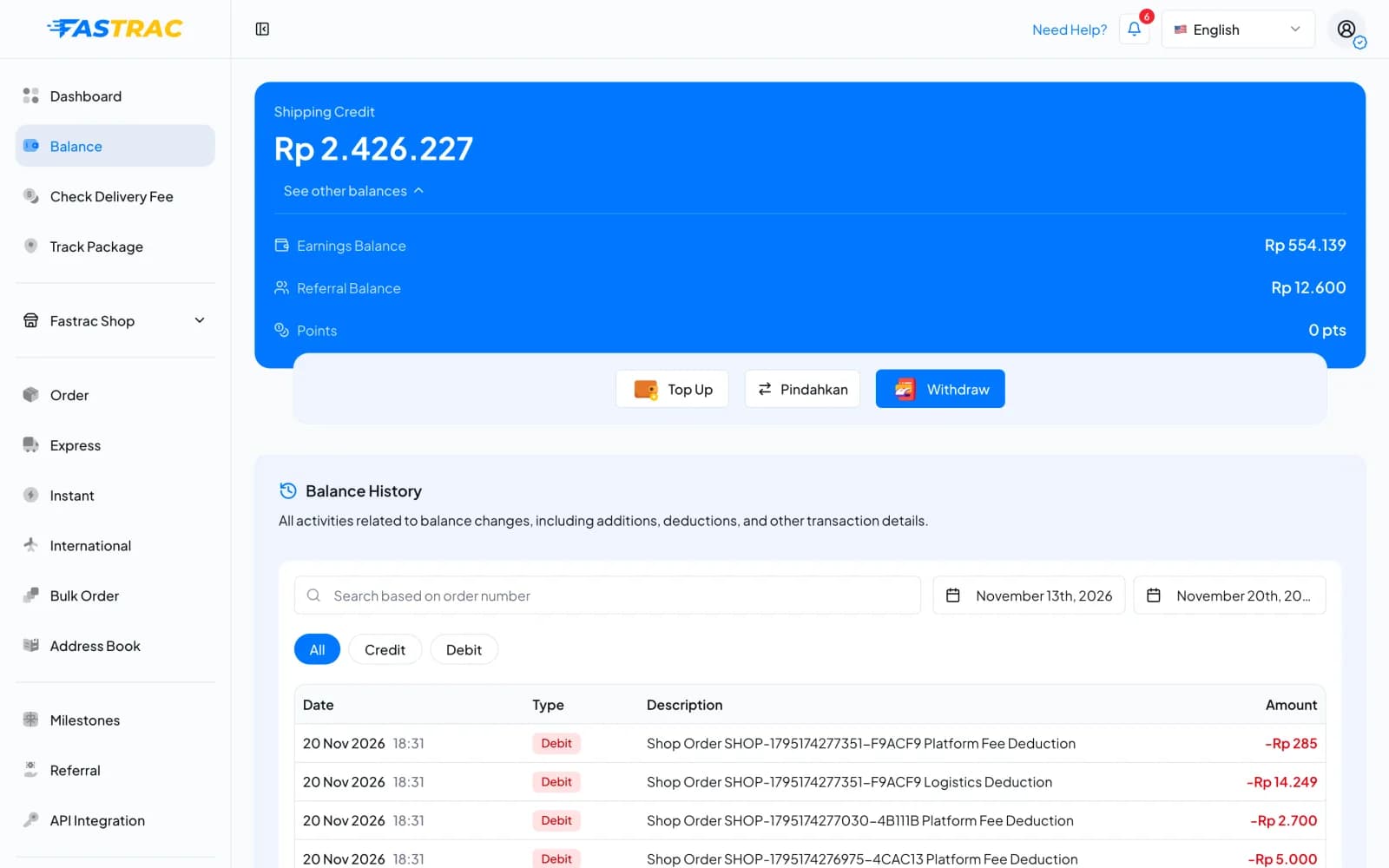
Your Shipping Credit and Earnings Balance also appear at the top of the Dashboard page.
How money moves
Fees and limits
| Item | Value |
|---|---|
| Keeping a balance | Free |
| Shipping credit | Can't be withdrawn to a bank. Use it for shipping. |
| Payout withdrawal | Minimum Rp 10.000, fee Rp 1.000 (details) |
| Top-up | Manual request from Rp 50.000, free; QRIS (where offered) Rp 50.000 to Rp 2.000.000, fee 0.75% (details) |
| Transfers between your own pockets | Free |
FAQ
Shipping credit is prepaid money for shipping. Only the payout balance can be withdrawn. If you want to use earnings for shipping, you can move payout balance into shipping credit, but not the other way.
Refunds go back to where the money came from. Shipments paid with shipping credit are refunded to shipping credit. Shipments paid by QRIS, virtual account or payout balance are refunded to your payout balance, so you can withdraw the money.
After the shipment is delivered. Check your balance history for the credit for that shipment. If a COD shipment is returned to you (RTS), no COD money is paid for it.
It may be a price adjustment (the courier re-weighed your parcel) or a return (RTS) fee. Find the entry in your balance history. It names the airway bill (resi).
No. Each person has their own balance and pays for their own shipments.
Was this page helpful?