

Cancel and refunds
Cancel a shipment or a whole order, and where the refund goes.
- Product
- APPFastrac App
- Section
- Shipping
- Reading time
- 3 min read
You can cancel a shipment until it is delivered. A paid shipment is refunded to where the money came from. After the courier has the booking, the courier must also accept the cancellation.
Who can do this
- Cancel a shipment: your role must allow cancelling orders.
- Cancel an order: you must be the one who created it. Cancelling an order cancels every shipment in it.
Steps
Cancel one shipment
- Open Order in the sidebar and click the order number (
SHP-…) to open Order Detail. - Click Cancel Order. The button only appears while the shipment is waiting for payment, being booked, or awaiting pickup or drop-off. For AnterAja, it unlocks 5 minutes after the shipment was created.
- Read the Refund Information in Cancel Order?: it shows the amount that goes back to your balance once the courier confirms the cancellation. Click Yes, Cancel, or Back to keep the shipment.
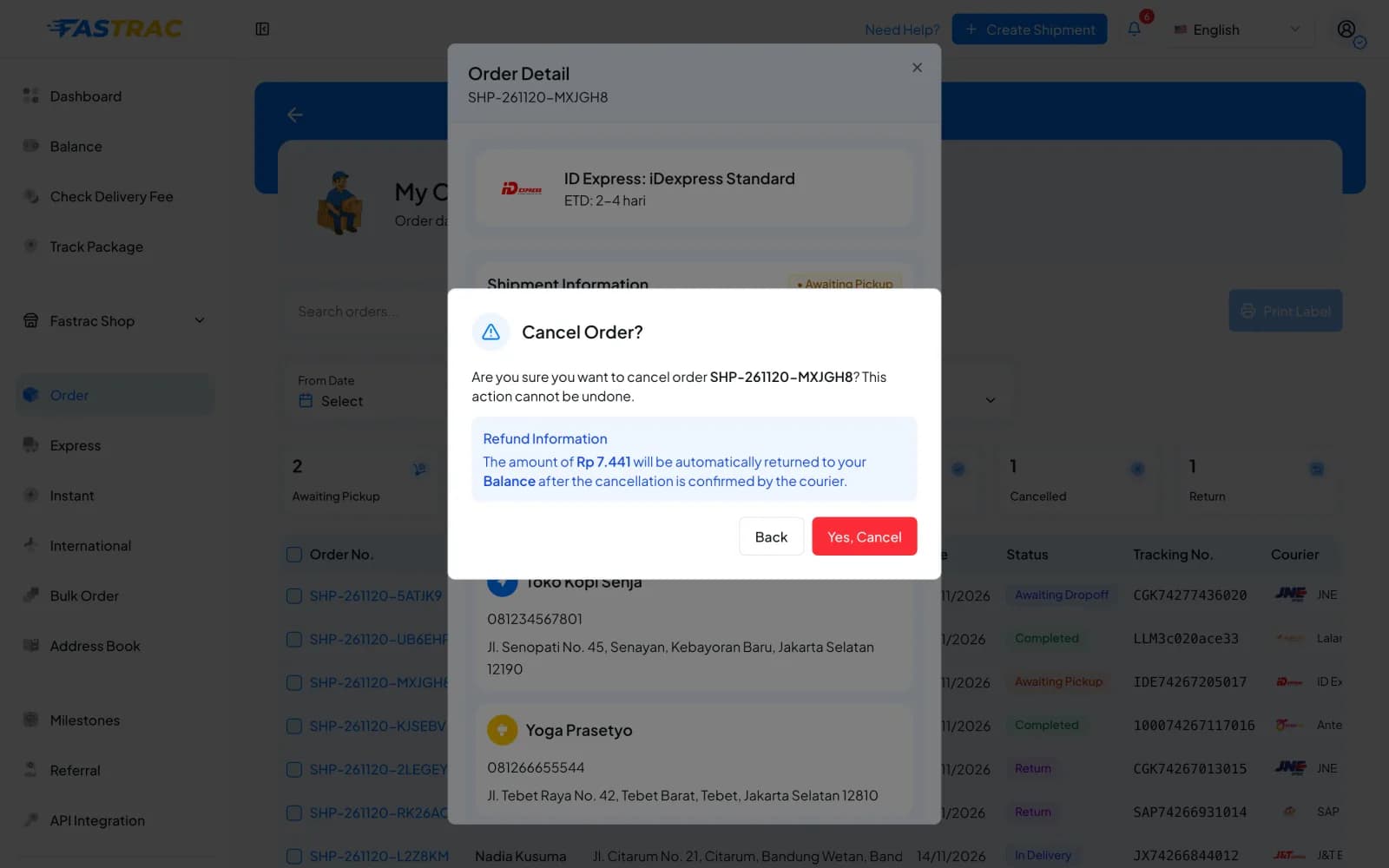
- The status changes to Cancelled and the refund appears in your balance history.
Cancel a whole order
- Unpaid order: open Express › Process Shipment, go to the Waiting for Payment tab, open the order's menu (⋮) and choose Cancel Order.
- Paid order with several shipments: the dashboard has no button to cancel the whole order at once. Cancel each shipment as above. (With the API you can cancel a whole order in one call.)
When you can cancel
| Shipment situation | Can you cancel? |
|---|---|
| Not paid yet | Yes. Nothing to refund. |
| Paid, courier not booked yet (no airway bill) | Yes, immediately. |
| Courier booked (has an airway bill), not picked up yet | Yes, if the courier accepts the cancellation. If the courier refuses, the shipment stays active. |
| Picked up or in transit | Not from the dashboard: Cancel Order is no longer shown. Contact support. |
| Already cancelled | Nothing happens; it stays cancelled. |
| Delivered | No. |
| Being returned to the sender (RTS) | No. |
| Order with at least one delivered shipment | The order can't be cancelled; cancel the other shipments one by one. |
Where the refund goes
| You paid with | Refund goes to |
|---|---|
| Shipping credit | Shipping credit |
| Payout balance | Payout balance |
| QRIS | Payout balance |
| Points | Points |
| COD | Nothing to refund; the COD collection is cancelled. |
Each refund appears as a credit in your balance history, with the shipment code in the description.
Cancel before the pickup
Once the courier has picked the parcel up, cancelling usually isn't possible any more. Cancel as early as you can.
FAQ
The shipment stays active. If the parcel is already on its way, you can't stop it from the dashboard. Contact support with the shipment code.
Contact support with the shipment code. Refunds to shipping credit, payout balance, QRIS and points are automatic.
Refunds to your balance happen when the cancellation goes through. Check your balance history.
Yes. Cancel the shipment itself. The other shipments in the order are not affected.
Was this page helpful?