

Create a shipment
Book one shipment from a shipping rate, choose pickup or drop-off, and pay for it.
- Product
- APPFastrac App
- Section
- Shipping
- Reading time
- 6 min read
You create a shipment by choosing a shipping rate, adding the sender and receiver, choosing how the courier gets the parcel, and paying. Once paid, Fastrac books the courier and you get an airway bill (resi).
Who can do this
- Your account must be verified, and your role must allow creating orders.
- You need enough Shipping Credit or Payout Balance to pay, or you pay with QRIS.
- Cash on delivery (COD) can't be selected in the dashboard yet. See COD for sellers.
Steps
These steps are for regular couriers (Express). For same-city couriers, see Instant shipments below.
- Open Express in the sidebar. The Process Shipment page opens; click the + button at the bottom to start a new shipment.
- Sender: your primary address from the address book is filled in. To use another one, click Address Book, or the pencil icon to edit it.
- Recipient: click + (or Address History for someone you shipped to before). In Fill in Recipient Address, search for the address or click Pick From Map, then fill in Full Address, Name, Phone Number and Region. You can also click Address Book to pick a saved address. Click Confirm.
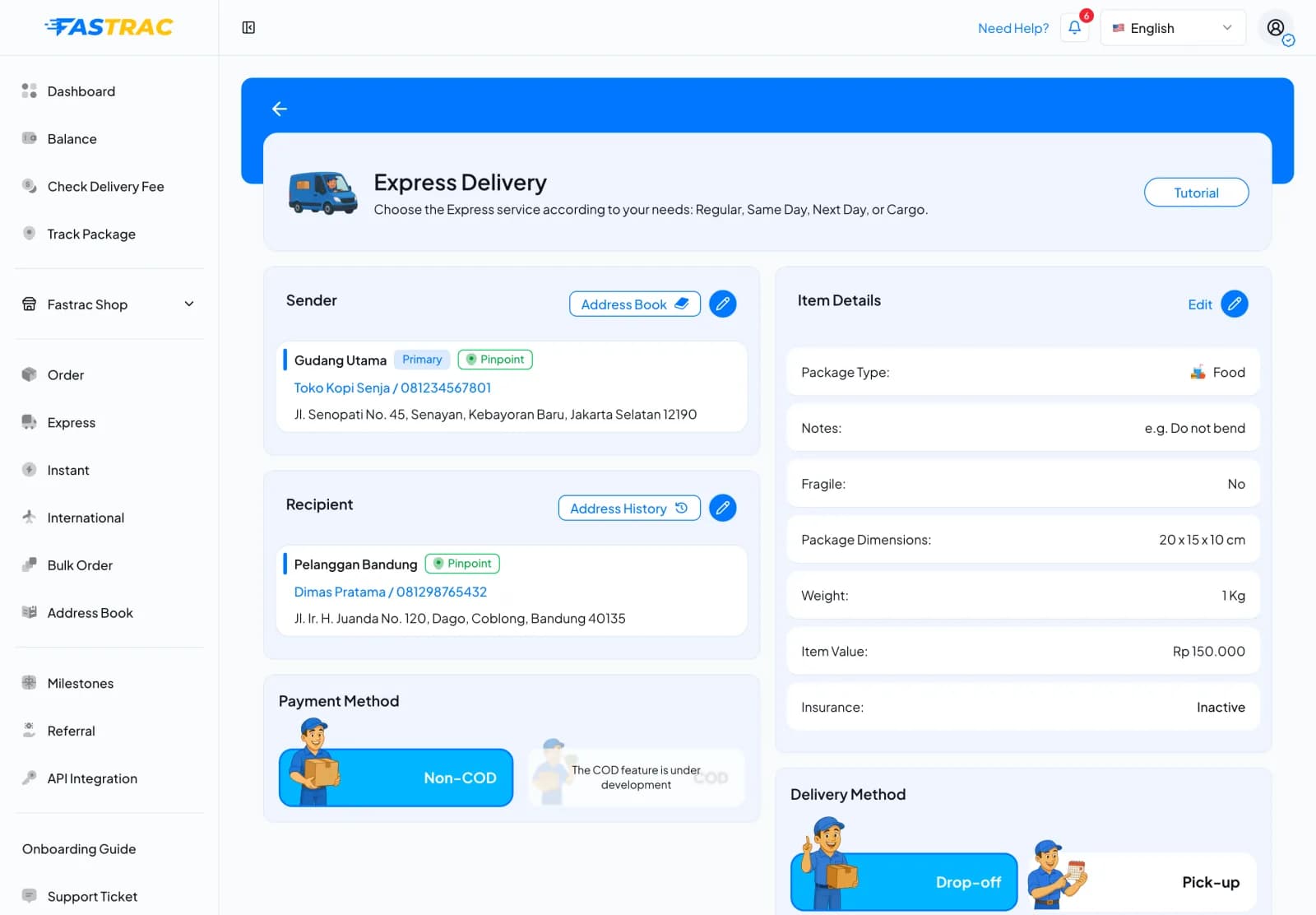
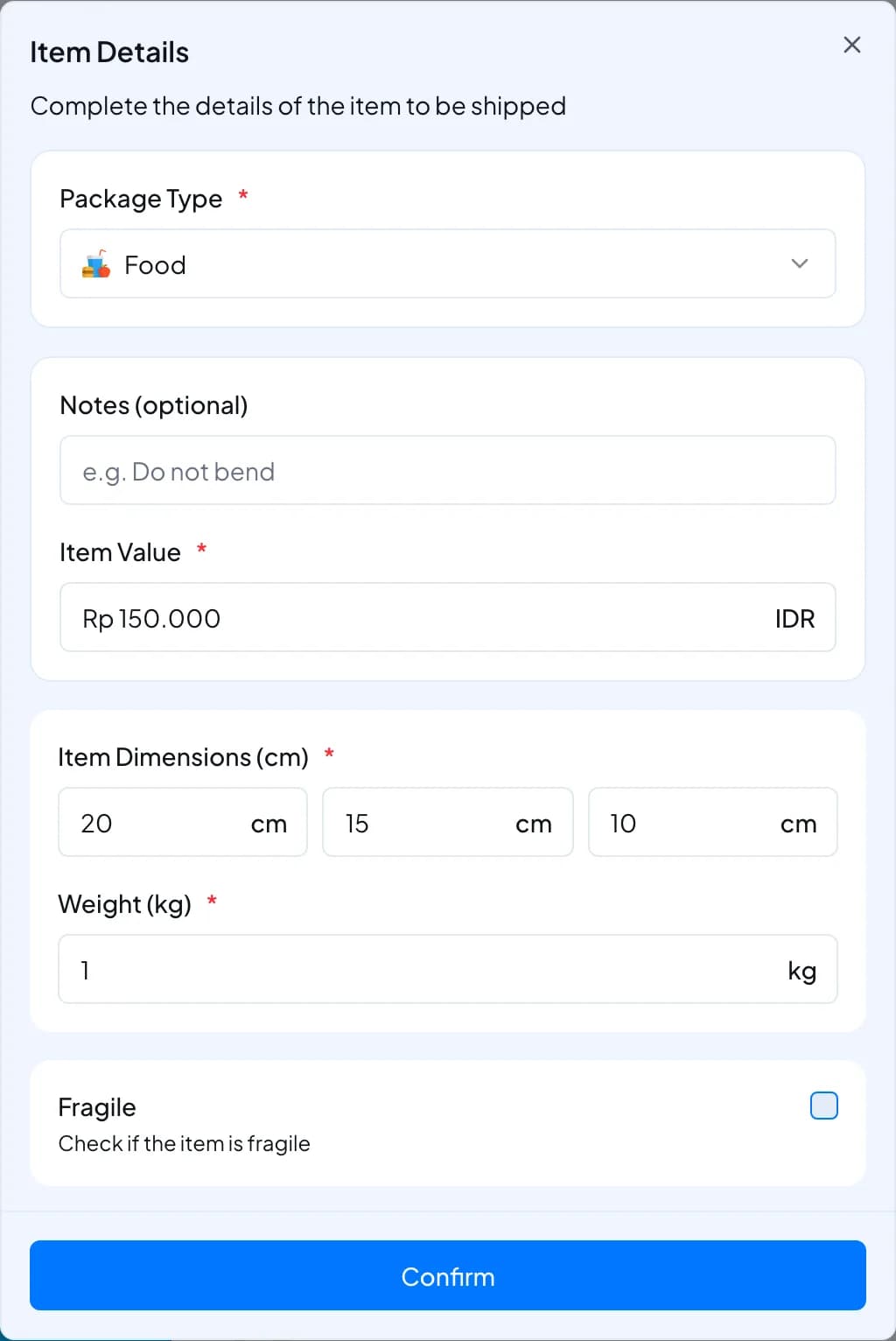
- Item Details: click Edit and fill in Package Type, Notes (optional), Item Value, Item Dimensions (cm) and Weight (kg). Tick Fragile if the item breaks easily, and turn on Shipping Insurance if you want it (it costs 0.3% of the item value). Click Confirm.
- Payment Method: keep Non-COD.
- Delivery Method: choose how the courier gets the parcel:
- Pick-up: the courier comes to the sender's address. Choose the pickup time when asked.
- Drop-off: you bring the parcel to a courier counter.
- Click Select Courier, pick a service on the Regular, Same Day, Next Day or Cargo tab, and click Next.
- On Review Order, check the courier, the delivery method, Shipping Insurance and the Payment Summary (delivery cost, discount, insurance, shipping VAT, platform fee and Total Payment). Click Change to pick another courier.
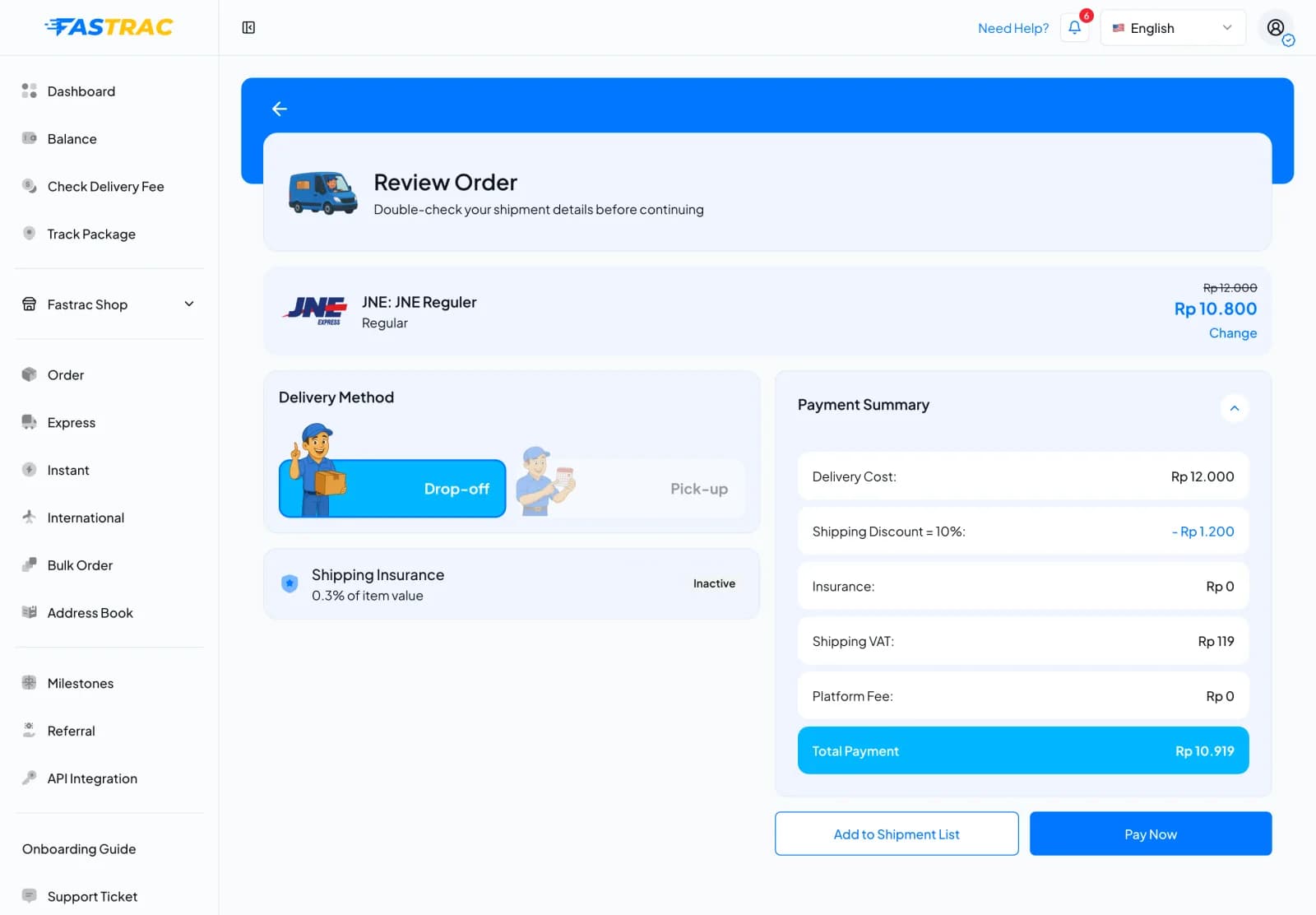
- Click Pay Now to pay for this shipment, or Add to Shipment List to pay for it later together with others (see Bulk shipments with the cart).
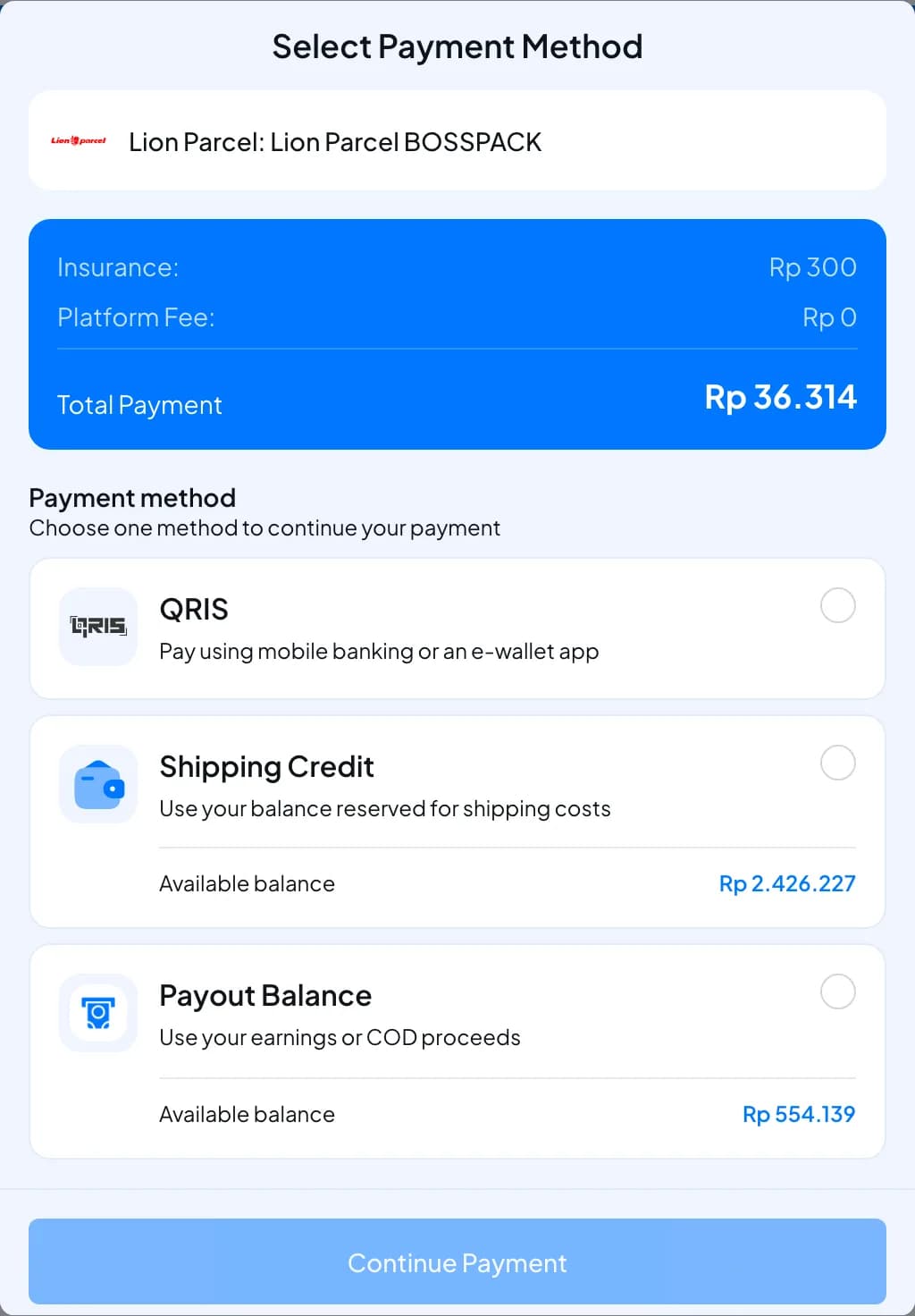
- In Select Payment Method, choose QRIS, Shipping Credit or Payout Balance, then click Continue Payment. Each balance shows its Available balance.
- After payment, the courier is booked. The shipment appears in Order with its tracking number (resi) and the status Awaiting Pickup or Awaiting Dropoff.
If you don't finish paying, the order waits on the Waiting for Payment tab of Process Shipment. Click Continue to Pay there to pay it.
Instant shipments
- Open Instant in the sidebar.
- Fill in Pick up from? and Deliver to?.
- Under Select Vehicle, choose a vehicle that fits the parcel (for example Motorcycle: 0.5 × 0.5 × 0.5 m, up to 20 kg).
- Under Pickup Schedule, choose Now or Scheduled.
- Fill in Item Details, click Select Courier, then review and pay as above.
One order, one or more shipments
An order is what you pay for. It can hold one shipment or several (see Bulk shipments with the cart). Delivery progress is tracked per shipment.
Pickup or drop-off
| Pickup | Drop-off | |
|---|---|---|
| Who moves the parcel to the courier | The courier collects it from the sender | You bring it to a courier counter |
| Pickup time | You choose it, or "as soon as possible" | Not needed |
| Instant couriers | Always pickup | Not available |
| Regular couriers | Only if the service supports pickup; the sender location must be pinned on the map | Only if the service supports drop-off |
If you don't choose, instant services use pickup and regular services use drop-off.
Pickup schedule and time slots
- Choose a pickup time at least 15 minutes from now (Jakarta time, WIB). Some couriers need more notice: ID Express 2 hours, Paxel 1 hour.
- Some couriers publish pickup time slots. When they do, the app shows the slots you can choose from.
- Lalamove, Dash and Blitz book exactly the pickup time they priced. If you want a different time, check rates again with that time.
- If you leave the pickup time empty, the courier picks up as soon as possible.
Limits
| Item | Limit |
|---|---|
| Earliest pickup | 15 minutes from now (ID Express 2 hours, Paxel 1 hour) |
| Rate validity | Usually about 15 minutes; book before it expires |
| COD and non-COD | Can't be mixed in one order |
| Vehicle capacity (instant) | The parcel must fit the vehicle you chose |
FAQ
The rate's validity ran out before you booked. Check rates again and book the new rate.
The pickup time must be at least 15 minutes ahead (more for some couriers). Choose a later time.
No. The order stays unpaid and any amount taken is returned. Fix the cause (for example, top up your shipping credit) and pay the order again.
For a regular pickup, the courier needs the exact sender location to send a driver. Pin it on the map or pick an address book entry that has a location.
As soon as the courier accepts the booking, usually right after payment. You can see it on the shipment detail and use it to track the shipment.
Was this page helpful?