

Referrals
Share your referral code, earn 1% of your referrals' shipments, and move earnings to your payout balance.
- Product
- APPFastrac App
- Section
- Money
- Reading time
- 4 min read
Invite other people to Fastrac with your referral code. Each time a shipment of someone you referred is delivered, you earn 1% of the amount they paid for it, in your referral balance.
Who can do this
- Any signed-in user has a referral code and can share it.
- Anyone can link one referral code to their account, once. You can't use your own code.
Share your code
- Select Referral in the sidebar.
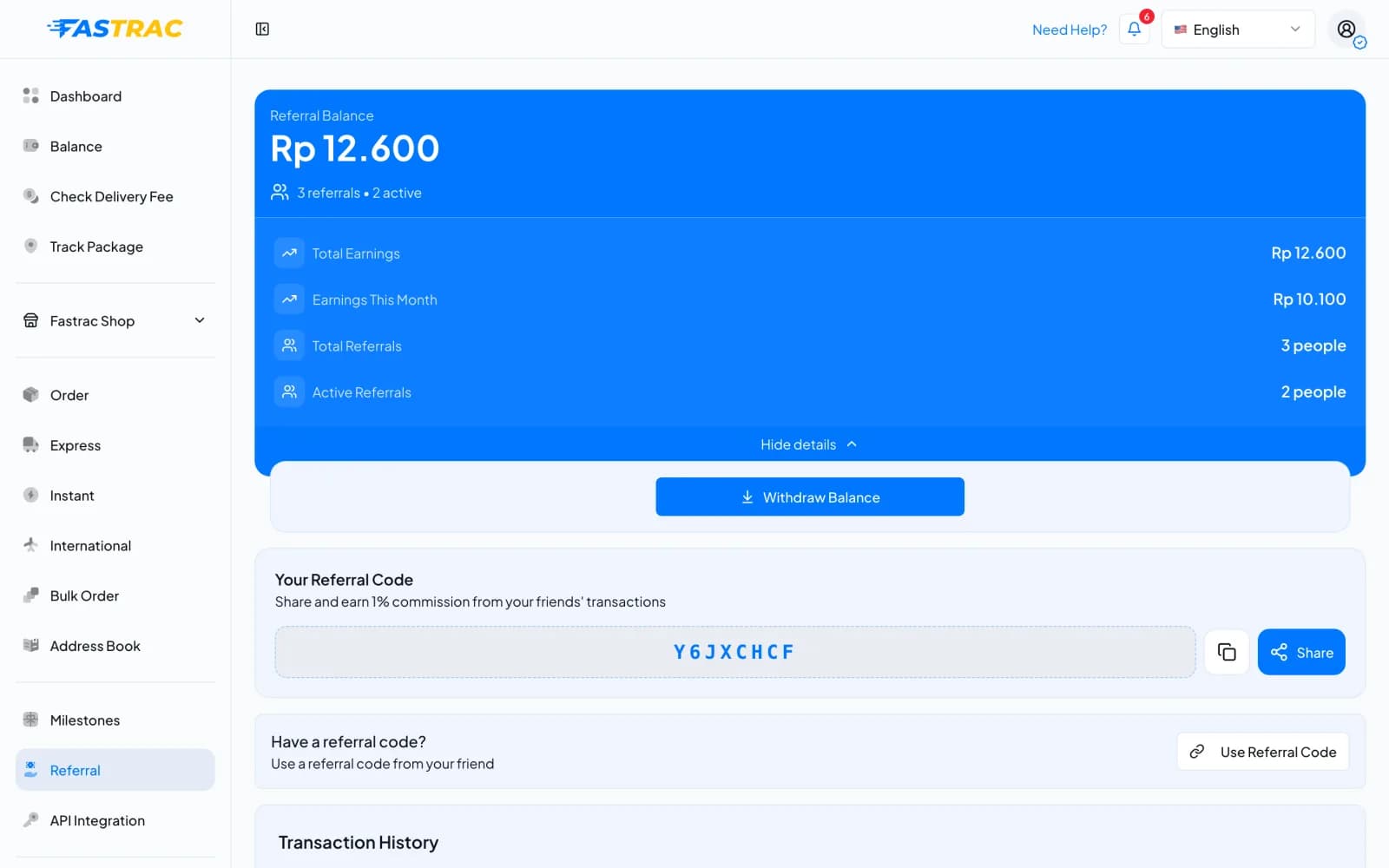
- Under Your Referral Code, select the copy icon or Share, and send the code to people who ship.
- They enter your code on their own Referral page (see below).
Link someone else's code
- Open Referral and, under Have a referral code?, select Use Referral Code.
- Type the code you received under Referral Code and select Link Code.
You can link a code only once, and you can't change it afterwards.
How you earn
| Rule | Detail |
|---|---|
| Commission | 1% of what your referral paid for the shipment, rounded down to the rupiah |
| When | When the shipment is delivered |
| Not counted | Shipments returned to the sender (RTS), cancelled shipments, and shipments with nothing paid |
| Paid into | Your referral balance |
Example: someone you referred pays Rp 25.000 for a shipment and it's delivered. You earn Rp 250.
Track your earnings
Open Referral to see:
- your Referral Balance, with Total Earnings and Earnings This Month (select See more stats if they're hidden);
- Total Referrals and Active Referrals;
- the Transaction History: each earning with the shipment code, the date, the amount, its type and its status. You can search by shipment code and filter by Status and Type. Select an entry for its details.
| Earning type | Meaning |
|---|---|
| Shipment Commission | 1% from a delivered shipment |
| Withdrawal | Money you moved to your payout balance |
| Redemption, Adjustment | Other changes made by Fastrac |
| Status | Meaning |
|---|---|
| Earned | The amount is in your referral balance |
| Pending | Recorded, not yet added to your referral balance |
| Reversed | Cancelled. The amount doesn't count. |
Move earnings to your payout balance
Referral balance can't be withdrawn directly. Move it to your payout balance first.
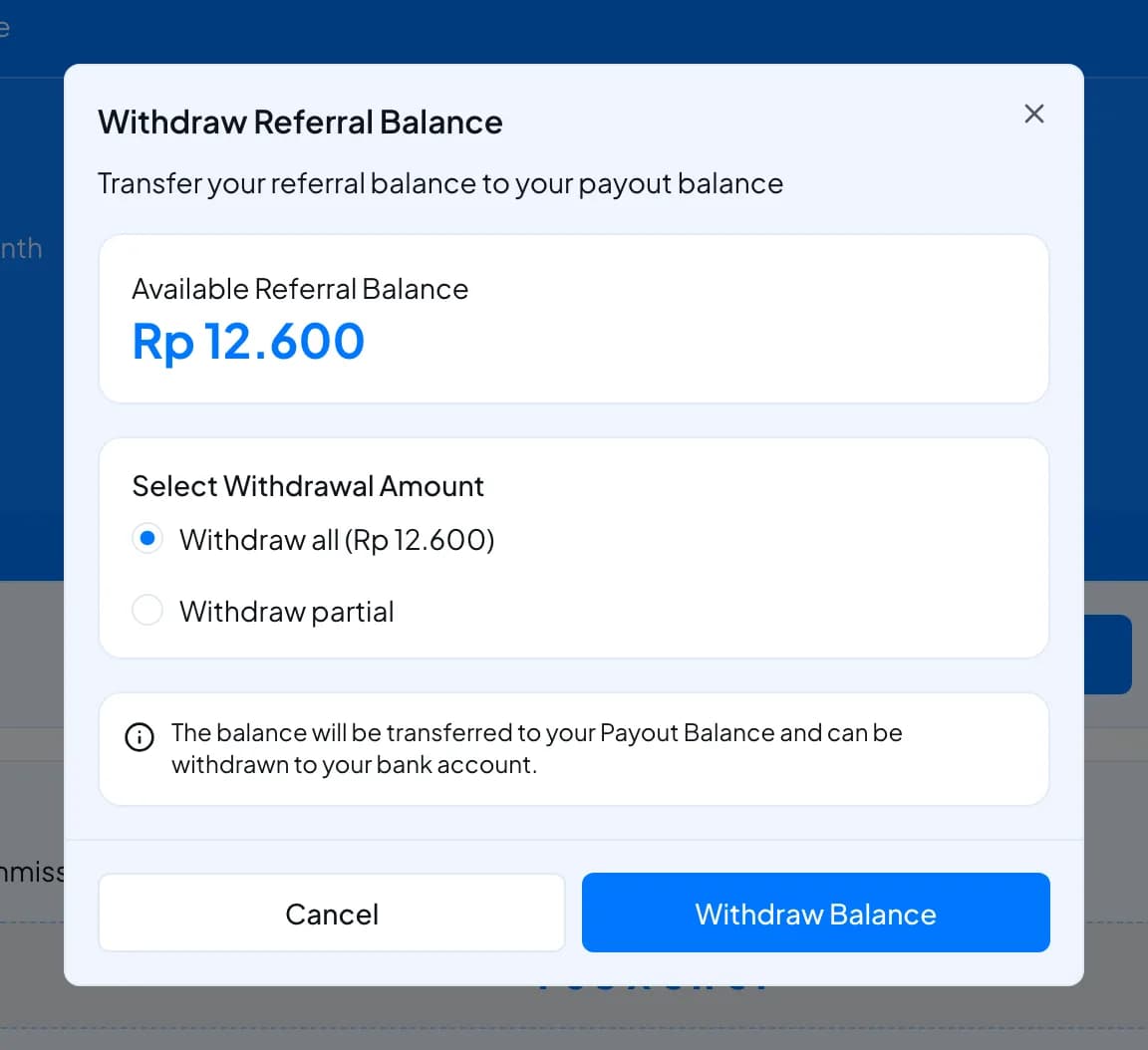
- Open Referral and select Withdraw Balance. The Withdraw Referral Balance window opens.
- Under Select Withdrawal Amount, keep Withdraw all or choose Withdraw partial and enter an amount.
- Select Withdraw Balance. The amount moves to your payout balance (Earnings Balance) immediately. Despite the name, nothing is sent to your bank yet.
- From there you can withdraw it to your bank or move it to shipping credit.
Fees and limits
| Item | Value |
|---|---|
| Commission | 1% of the paid amount of each delivered, non-returned shipment |
| Codes you can link | One, once |
| Moving referral balance to payout balance | Free, immediate, more than Rp 0 and up to your referral balance |
| Withdrawing to a bank | Through the payout balance: minimum Rp 10.000, fee Rp 1.000 |
FAQ
Your account already has a referral code linked. It can't be changed.
Check the spelling with the person who gave it to you.
You earn only when the shipment is delivered. Shipments that are cancelled or returned to the sender don't count. Very small amounts that round down to Rp 0 don't create an earning.
No. Your commission doesn't change what they pay.
Was this page helpful?