

Withdraw your payout balance
Send money from your payout balance to your bank account.
- Product
- APPFastrac App
- Section
- Money
- Reading time
- 3 min read
You can withdraw your payout balance (Saldo Penghasilan), such as COD proceeds and refunds, to your active bank account. The Fastrac team reviews each withdrawal and sends the money.
Who can do this
- Any signed-in user with money in their payout balance whose business verification (KYC) is approved. Without it, selecting Withdraw takes you to the verification page instead.
- You need a verified bank account. It comes from your business verification. See Bank accounts.
- You can have only one pending withdrawal at a time.
Steps
- Open Balance and select Withdraw (you can also select Withdraw on the Dashboard page).
- Check Available to withdraw (your payout balance) and the Bank Account shown. Withdrawals always go to this account.
- Enter the Withdrawal Amount you want to receive, at least Rp 10.000, or tick Withdraw All.
- Check the summary: Admin Fee (Rp 1.000), Total deducted from balance and Amount to be received.
- Select Withdraw. The amount plus the Rp 1.000 fee is taken from your payout balance straight away, and the withdrawal is pending.
- When the team approves it, you get a notification that the withdrawal is approved and being processed, and the money is sent to your bank account, usually within 1 to 3 business days.
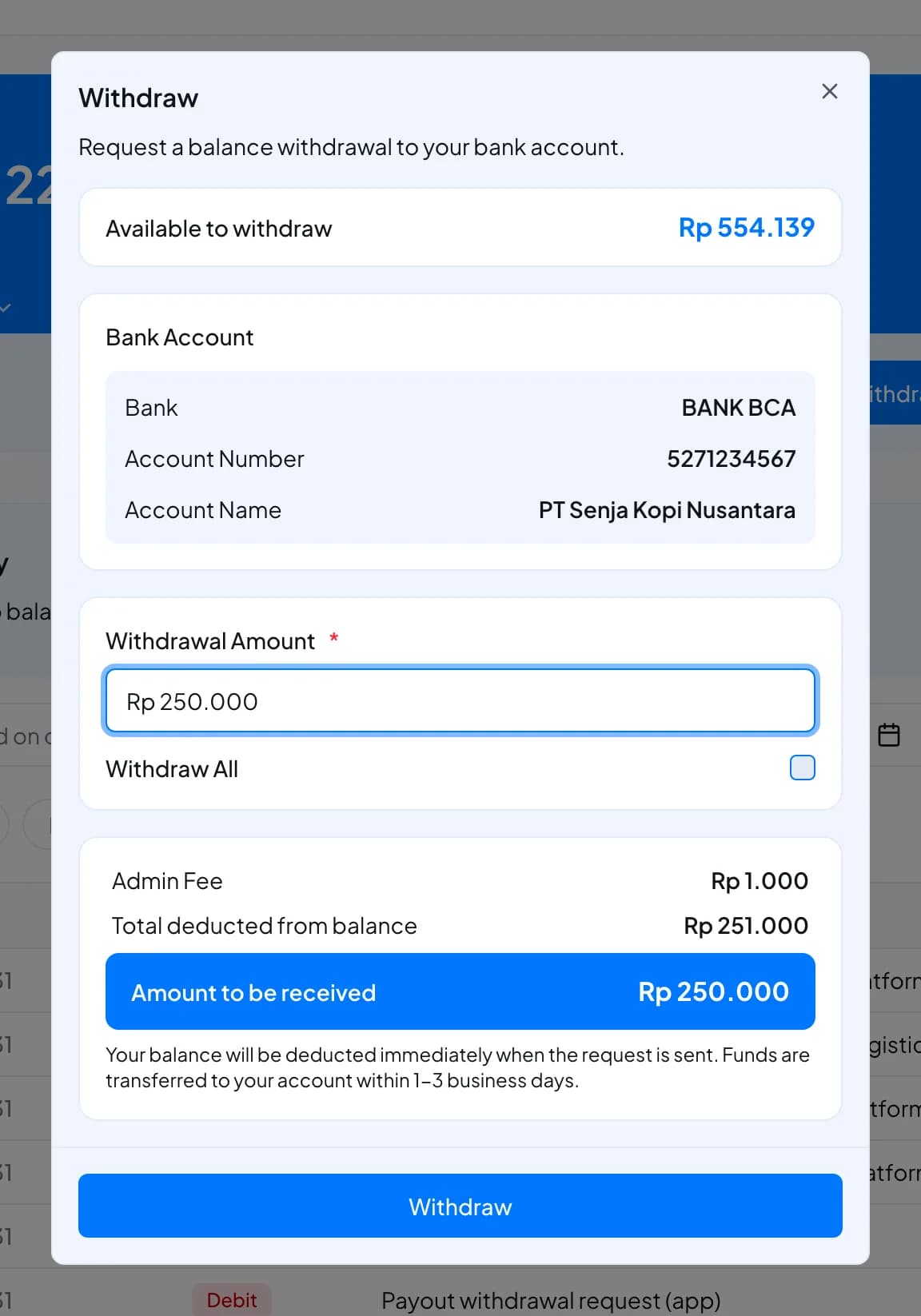
Example: you withdraw Rp 250.000. Your payout balance goes down by Rp 251.000, and Rp 250.000 reaches your bank account.
Statuses
| Status | Meaning |
|---|---|
| Pending | Waiting for review. The amount and fee are already taken from your payout balance. |
| Success | Approved and processed. The money is sent to your bank account. |
| Failed | Rejected. The amount and the fee are returned to your payout balance, and the notification tells you why. |
The dashboard has no separate list of withdrawals. Each withdrawal appears in your
balance history as a debit named Payout withdrawal request, and you get a
notification when its status changes.
Fees and limits
| Item | Value |
|---|---|
| Minimum withdrawal | Rp 10.000 |
| Fee | Rp 1.000 per withdrawal, on top of the amount |
| Pending withdrawals at once | One |
| Destination | The verified bank account shown in the Withdraw window |
| Arrival | Usually within 1 to 3 business days after approval |
| Which pocket | Payout balance only |
FAQ
Your payout balance must cover the amount plus the Rp 1.000 fee. For example, to withdraw Rp 10.000 you need at least Rp 11.000.
Your withdrawal account comes from your business verification. Select Complete Verification and finish your business verification. To change the account, see Bank accounts.
Wait until your current withdrawal is approved or rejected before you request another one.
Shipping credit can't be withdrawn. Referral balance must first be moved to your payout balance, then you can withdraw it.
Each withdrawal is reviewed by the Fastrac team. You get a notification when it's approved or rejected. If it has been pending for a long time, contact support.
Yes. A rejected withdrawal returns the full amount you were charged, including the fee.
Was this page helpful?